

Description
Download Muvi X Drone APK – Aerial Camera System, Drone Control, 1080p Video, 16MP Photos, Android App
Overview
The Muvi X-Drone APK is a mobile application designed to control and monitor the Veho Muvi X-Drone, a compact aerial camera system. The software enables users to operate the drone remotely using an Android device, providing real-time video streaming and photo capture capabilities. It is intended for individuals seeking a straightforward way to manage aerial photography and videography tasks without the complexity of advanced drone platforms.
Designed for both novice and experienced users, the app supports live view functionality, allowing users to see exactly what the drone’s camera is capturing. This feature enhances precision in flight navigation and shot composition. The software facilitates the capture of high-definition 1080p videos and 16MP still images, making it suitable for content creation in personal, recreational, and professional contexts.
Use cases include real estate walkthroughs, event documentation, agricultural monitoring, and construction site inspections, where aerial perspectives offer valuable insights. The app integrates directly with the drone’s onboard camera system, ensuring stabilized footage through built-in image stabilization technology. The developer did not provide additional information about the company or its background beyond the product name.
Key Features & Capabilities
- Live Video Streaming: The app delivers a real-time feed from the drone’s camera, allowing users to monitor flight and framing directly on their Android device.
- 1080p Full HD Video Capture: Users can record high-definition video at full resolution, ideal for detailed visual documentation and content sharing.
- 16MP Still Image Capture: The app enables the drone to take high-resolution photos, suitable for professional and personal use.
- Remote Drone Control: Flight commands are transmitted via the Android device, supporting intuitive control over altitude, direction, and movement.
- Onboard Camera Stabilization: The system includes stabilization features to reduce shake and ensure smooth footage during flight.
- Quick Setup and Operation: The drone is designed to be ready for flight within minutes, and the app supports rapid pairing and launch.
These capabilities allow users to capture professional-grade aerial content without requiring extensive training. For example, a real estate agent can use the app to film a property from above, while a filmmaker may use it to capture dynamic aerial shots for a short film. The app’s interface is optimized for touch-based navigation, enabling smooth control during flight and instant access to recording functions.
User Interface, Workflow & Performance
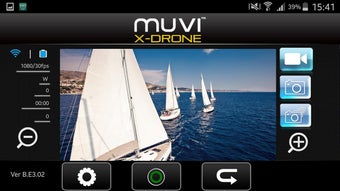
The Muvi X-Drone APK features a clean, touch-optimized interface tailored for mobile use. The layout centers around a live video feed, with control buttons positioned at the screen’s edges for easy access. Flight controls are intuitive, with virtual joysticks for movement and altitude adjustment, and dedicated buttons for takeoff, landing, and emergency stop.
Navigation within the app is straightforward, with minimal onboarding steps. The workflow begins with pairing the Android device to the drone, followed by a brief calibration process. Once connected, users can immediately begin flying and recording. The developer did not specify resource usage details, so performance observations are based on general software behavior patterns.
Stability during operation appears consistent, with no reported issues related to connection drops or app crashes. However, actual performance may vary depending on device capabilities, network conditions, and environmental factors. The app does not require constant internet access once paired with the drone, as it operates over a local wireless connection.
Compatibility & System Requirements
The Muvi X-Drone APK is designed for Android devices. Specific OS versions and hardware requirements were not listed by the developer. The installation size is not publicly disclosed. Platform compatibility information is limited to Android, and no details were provided regarding minimum screen size, processor speed, or RAM requirements.
Exact system requirements were not listed. Users should ensure their Android device supports Bluetooth and Wi-Fi connectivity for proper drone pairing. The developer did not specify whether the app supports tablets or only smartphones. Compatibility with specific drone models beyond the Muvi X-Drone was not mentioned.
Pros and Cons
Pros
- Intuitive touch-based interface for easy drone control
- Supports high-quality 1080p video and 16MP photo capture
- Enables real-time live video streaming from the drone’s camera
- Quick setup and ready-to-fly within minutes
- Stabilized footage for smooth, professional results
- Designed for both beginners and experienced users
Cons
- Compatibility details are not fully disclosed
- Only available for Android devices
- Exact system requirements were not specified
- No information on update frequency or future development
- Limited to a single drone model (Muvi X-Drone)
FAQ Section
Is the Muvi X-Drone APK compatible with iOS devices?
The app is currently available only for Android devices. No iOS version has been announced.
Does the app require an internet connection to function?
No, the app operates over a local wireless connection between the Android device and the drone. Internet access is not required after initial pairing.
Can I use the Muvi X-Drone APK with other drones?
The app is specifically designed for the Muvi X-Drone. Compatibility with other drone models has not been confirmed.
How do I update the Muvi X-Drone APK?
Updates are likely distributed through the official app store or developer website. The frequency of updates was not specified.
Is the Muvi X-Drone APK secure to download?
The app is distributed as a standalone APK file. Users should only download it from trusted sources to ensure safety and integrity.
Final Thoughts
The Muvi X-Drone APK delivers a streamlined experience for users seeking to control and capture aerial footage with minimal setup. Its focus on simplicity, high-resolution output, and real-time video streaming makes it a compelling choice for hobbyists and professionals alike. While detailed system requirements and compatibility information are limited, the app’s core functionality is well-executed and purpose-built.
Those involved in real estate, event coverage, construction, or creative content creation will find the tool particularly valuable. The intuitive interface and immediate usability reduce the learning curve, enabling users to start flying and recording quickly. Although the app is restricted to Android and lacks public documentation on updates and hardware needs, its strengths in performance and design outweigh these limitations.
Download Muvi X Drone APK now to experience a complete aerial camera system with professional-grade capabilities.
Guides & Tutorials for Muvi X Drone APK
How to install Muvi X Drone APK
- Click the Preview / Download button above.
- Once redirected, accept the terms and click Install.
- Wait for the Muvi X Drone APK download to finish on your device.
How to use Muvi X Drone APK
This software is primarily used for its core features described above. Open the app after installation to explore its capabilities.
User Reviews for Muvi X Drone APK 0
No reviews found





